
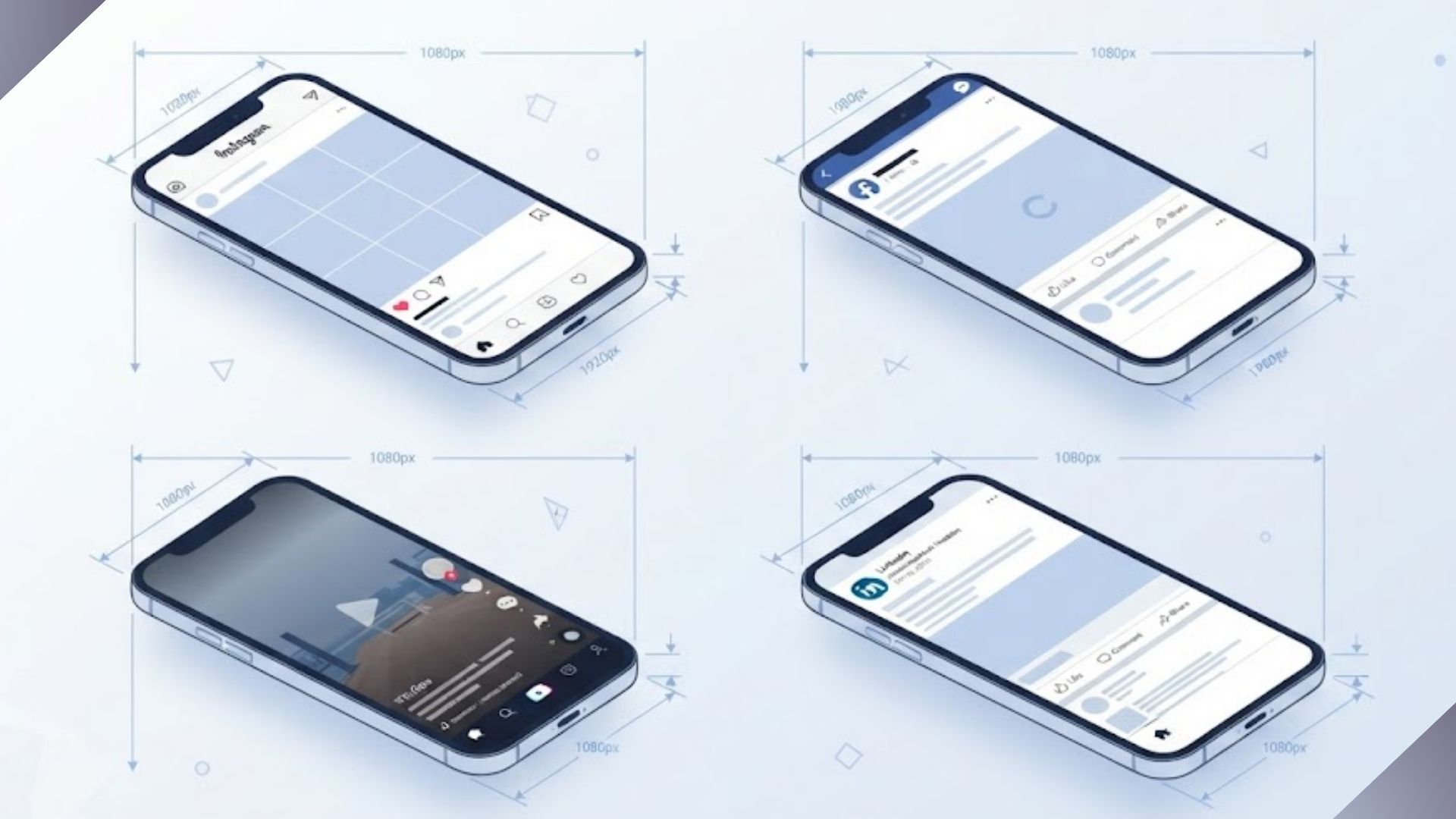
You spend an hour designing the perfect post. The colors are right, the text is clear, everything looks amazing on your laptop. Then you upload it to Instagram and watch your beautiful creation get chopped, stretched, or squeezed into something you barely recognize.
Sound familiar?
Here is the frustrating truth. Every social media platform has its own idea of what the perfect image size should be. Instagram wants one thing. Facebook wants another. LinkedIn plays by its own rules entirely. And just when you finally memorize all the numbers, a platform updates its layout and you are back to square one.
I have been there. After managing social media content for brands across multiple industries, I stopped counting how many times I had to redo an image because I used the wrong dimensions. It is one of those small problems that quietly eats up hours of your week.
So I decided to put everything in one place. This guide covers social media image sizes for every major platform in 2026, with exact dimensions, simple explanations, and a free tool to resize your images in seconds. No more guessing. No more redoing work.
Let’s get into it.
Social Media Image Sizes: Master Reference Table (2026)
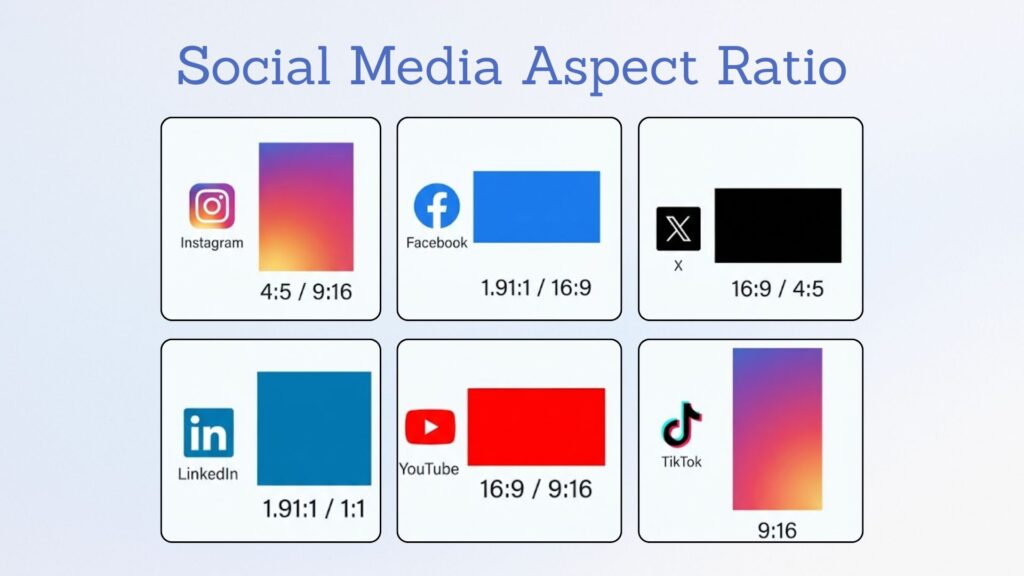
Bookmark this table. It is your quick look cheat sheet for every major platform.
| Platform | Image Type | Dimensions (px) | Aspect Ratio |
|---|---|---|---|
| Feed (portrait) | 1080 x 1350 | 4:5 | |
| Feed (square) | 1080 x 1080 | 1:1 | |
| Feed (landscape) | 1080 x 566 | 1.91:1 | |
| Stories / Reels | 1080 x 1920 | 9:16 | |
| Profile photo | 320 x 320 | 1:1 | |
| Feed post (portrait) | 1080 x 1350 | 4:5 | |
| Feed post (square) | 1080 x 1080 | 1:1 | |
| Link preview | 1200 x 630 | 1.91:1 | |
| Cover photo (Page) | 851 x 315 | 2.7:1 | |
| Cover photo (Group) | 1640 x 856 | 1.92:1 | |
| Event cover | 1920 x 1005 | 1.91:1 | |
| Stories | 1080 x 1920 | 9:16 | |
| X (Twitter) | In feed image | 1600 x 900 | 16:9 |
| Profile photo | 400 x 400 | 1:1 | |
| Header | 1500 x 500 | 3:1 | |
| Link card | 1200 x 628 | 1.91:1 | |
| Feed image | 1200 x 627 | 1.91:1 | |
| Profile banner | 1584 x 396 | 4:1 | |
| Company page banner | 1128 x 191 | 5.9:1 | |
| Profile photo | 400 x 400 | 1:1 | |
| YouTube | Thumbnail | 1280 x 720 | 16:9 |
| Channel banner | 2560 x 1440 | 16:9 | |
| Profile photo | 800 x 800 | 1:1 | |
| TikTok | Video / Story | 1080 x 1920 | 9:16 |
| Profile photo | 200 x 200 | 1:1 | |
| Standard Pin | 1000 x 1500 | 2:3 | |
| Threads | Feed image | 1080 x 1350 | 4:5 |
| Profile photo | 320 x 320 | 1:1 |
One tip that saves time: If you only remember one size, make it 1080 x 1350 (4:5 portrait). This format works across Instagram, Facebook, and Threads, and it consistently performs better than square posts for engagement.
The 4 Shapes That Cover 90% of Social Media
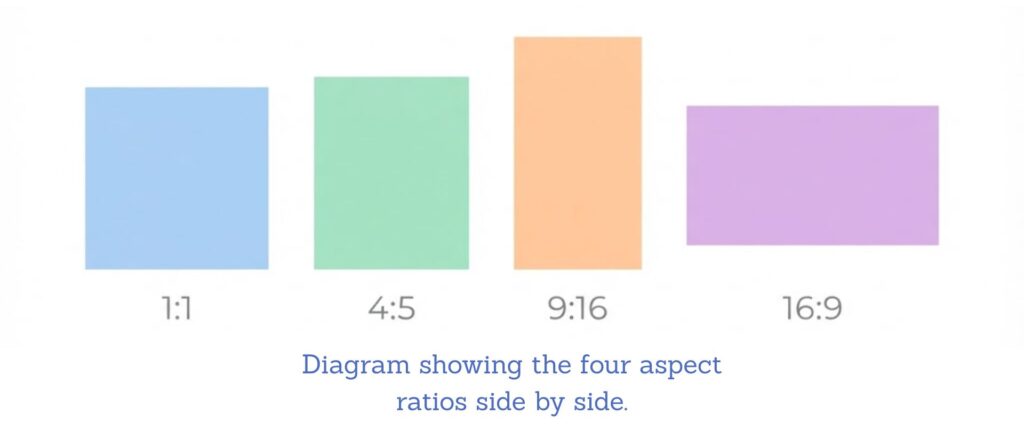
Here is something that took me way too long to figure out. You do not need to memorize dozens of different numbers. Almost every platform uses just four aspect ratios.
| Shape | Dimensions | Where It Is Used |
|---|---|---|
| Square (1:1) | 1080 x 1080 | Instagram feed, Facebook feed, LinkedIn |
| Portrait (4:5) | 1080 x 1350 | Instagram feed, Facebook feed, Threads |
| Vertical (9:16) | 1080 x 1920 | Stories, Reels, TikTok, YouTube Shorts |
| Landscape (16:9) | 1920 x 1080 | YouTube thumbnails, X posts, LinkedIn video |
Learn these four shapes and you can handle almost any social media image size situation without opening a guide.
Instagram Image Sizes (2026)
Instagram feed posts work best at 1080 x 1350 pixels (4:5 ratio). Stories and Reels use 1080 x 1920 pixels (9:16).
Instagram Feed Post Sizes
| Post Type | Dimensions | Aspect Ratio |
|---|---|---|
| Portrait | 1080 x 1350 | 4:5 |
| Square | 1080 x 1080 | 1:1 |
| Landscape | 1080 x 566 | 1.91:1 |
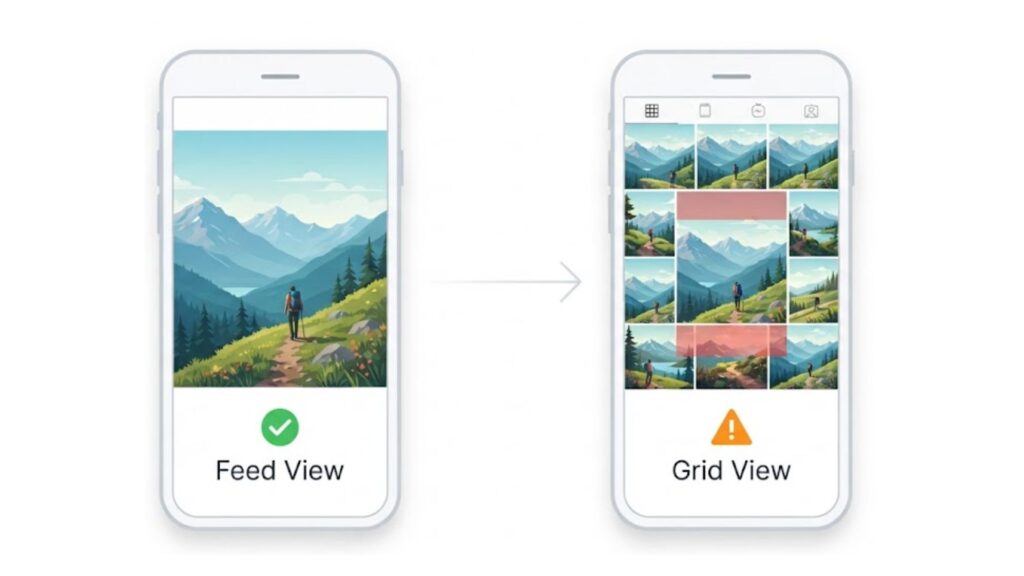
Instagram has shifted toward favoring vertical content. Portrait posts take up more screen space before someone scrolls past, which is why most brands now default to the 4:5 social media image size for feed posts.
One thing I learned the hard way: Your Instagram grid now crops to 3:4. Design with the center square in mind because anything at the very top or bottom of your portrait image may get trimmed in grid view.
Instagram Stories and Reels Sizes
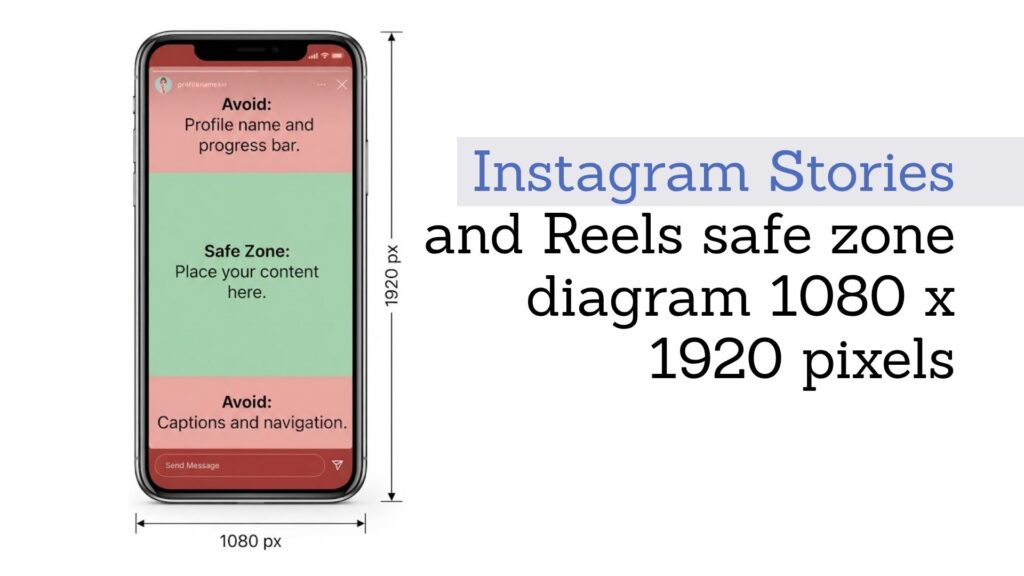
Both Stories and Reels use the full screen vertical format of 1080 x 1920 pixels (9:16).
Keep your important content in the center of the canvas. Leave roughly 250 pixels clear at the top and bottom for interface elements like your profile name, captions, and navigation buttons.
Instagram Profile Photo Size
Upload at 320 x 320 pixels. Instagram displays it as a circle, so keep your logo or face centered and away from the corners.
Facebook Image Sizes (2026)
Facebook feed posts are best at 1080 x 1350 pixels (4:5). Link previews use 1200 x 630 pixels.
Facebook Feed Post Sizes
| Post Type | Dimensions | Aspect Ratio |
|---|---|---|
| Portrait | 1080 x 1350 | 4:5 |
| Square | 1080 x 1080 | 1:1 |
| Landscape | 1200 x 630 | 1.91:1 |
Facebook Cover Photo Sizes
| Cover Type | Dimensions | Aspect Ratio |
|---|---|---|
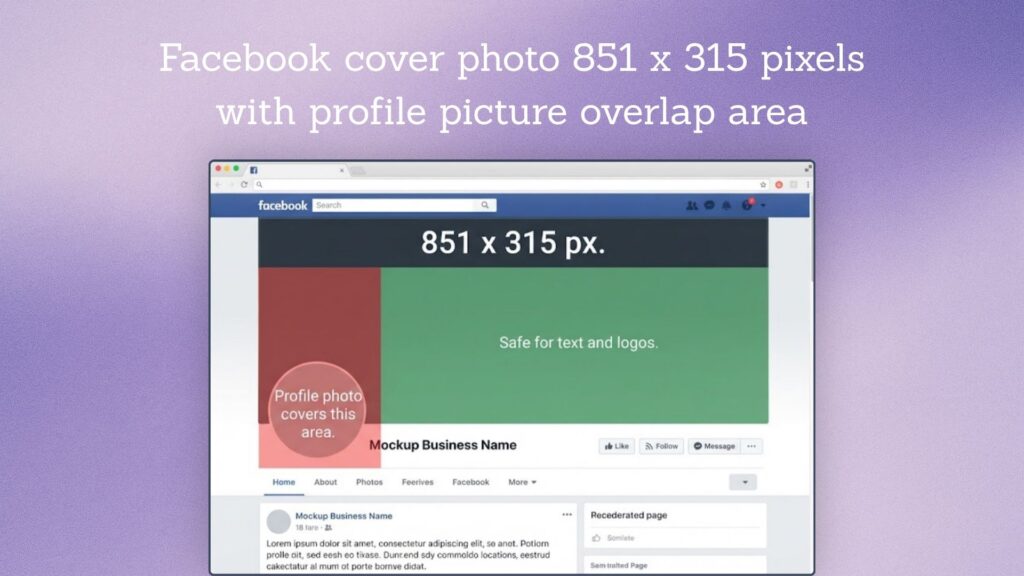
| Profile / Page | 851 x 315 | 2.7:1 |
| Group | 1640 x 856 | 1.92:1 |
| Event | 1920 x 1005 | 1.91:1 |
Facebook covers show up differently on desktop versus mobile. Your profile picture overlaps the bottom left corner of your cover photo, so avoid putting important text or logos there.
Facebook Stories
Use 1080 x 1920 pixels (9:16) for Facebook Stories. This matches Instagram Stories, so you can design once and post to both platforms.
X (Twitter) Image Sizes (2026)
X in feed images display without cropping at 1600 x 900 pixels (16:9).
| Image Type | Dimensions | Aspect Ratio |
|---|---|---|
| In feed (landscape) | 1600 x 900 | 16:9 |
| In feed (square) | 1080 x 1080 | 1:1 |
| In feed (portrait) | 1080 x 1350 | 4:5 |
| Profile photo | 400 x 400 | 1:1 |
| Header | 1500 x 500 | 3:1 |
| Link card | 1200 x 628 | 1.91:1 |
A note from experience: X profile photos display at about 128 x 128 pixels in the feed. Keep your logo or headshot simple and centered because complex designs become unreadable at that size.
For link cards, 1200 x 628 pixels is the standard. This also works for LinkedIn, so you can create one image for both platforms.
LinkedIn Image Sizes (2026)
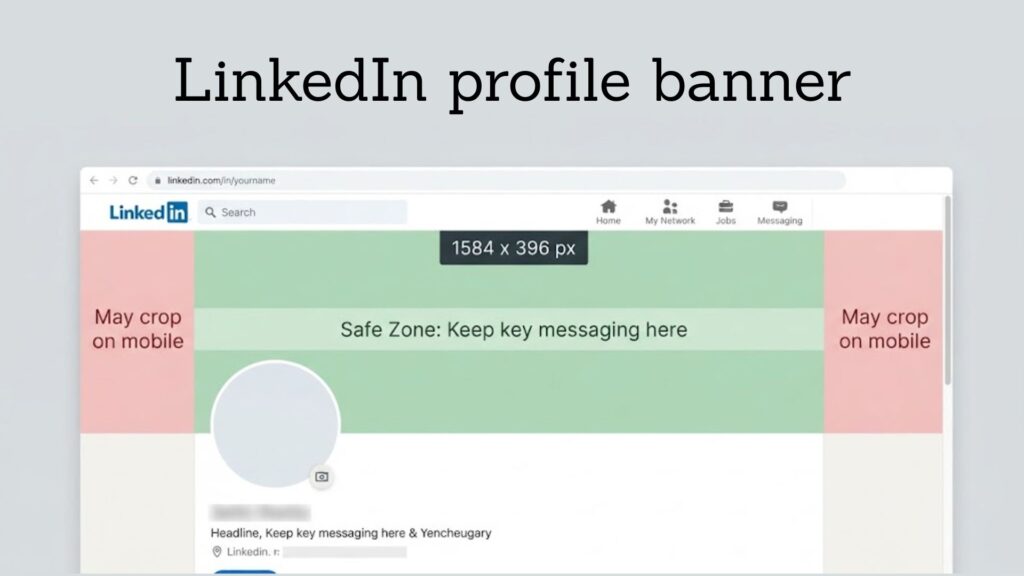
Quick LinkedIn feed images work best at 1200 x 627 pixels. Profile banners are 1584 x 396 pixels.
| Image Type | Dimensions | Aspect Ratio |
|---|---|---|
| Feed image | 1200 x 627 | 1.91:1 |
| Profile banner | 1584 x 396 | 4:1 |
| Company page banner | 1128 x 191 | 5.9:1 |
| Profile photo | 400 x 400 | 1:1 |
LinkedIn banners use an extreme letterbox format. If you design at a different ratio, it will crop badly. Keep your key messaging in the center horizontal band.
YouTube Image Sizes (2026)

YouTube thumbnails should be 1280 x 720 pixels (16:9), under 2MB.
| Image Type | Dimensions | Aspect Ratio |
|---|---|---|
| Video thumbnail | 1280 x 720 | 16:9 |
| Channel banner | 2560 x 1440 | 16:9 |
| Profile photo | 800 x 800 | 1:1 |
YouTube Thumbnail Best Practices
Your thumbnail is your first impression. After testing hundreds of thumbnails, here is what works:
- Use bold text. Keep it to 3 or 4 words maximum.
- High contrast. Make it pop in a crowded feed.
- Faces with clear expressions. They consistently outperform graphics.
- Test on mobile. Thumbnails display tiny in search results.
YouTube Channel Banner Safe Zone
Upload at 2560 x 1440 pixels, but know that only the central 1546 x 423 pixels displays on all devices. Keep your channel name, tagline, and posting schedule within this safe zone.
TikTok and Pinterest Image Sizes
TikTok
| Image Type | Dimensions | Aspect Ratio |
|---|---|---|
| Video / Story | 1080 x 1920 | 9:16 |
| Carousel image | 1080 x 1920 | 9:16 |
| Video thumbnail | 1080 x 1920 | 9:16 |
| Profile photo | 200 x 200 | 1:1 |
TikTok uses the same 9:16 vertical format as Stories and Reels. You can combine up to 35 images in a carousel, all at 1080 x 1920 pixels.
| Image Type | Dimensions | Aspect Ratio |
|---|---|---|
| Standard Pin | 1000 x 1500 | 2:3 |
Pinterest favors the 2:3 ratio. Taller pins get more visibility in the feed.
How to Resize Images for Social Media (Step by Step)
Here is the quickest way to resize any image for any platform.
Step 1: Upload your image
Drag your JPG, PNG, or WebP file into our free tool. Your original stays untouched.
Step 2: Select your platform preset
Choose Instagram, Facebook, LinkedIn, X, YouTube, or TikTok. The tool automatically applies the correct dimensions.
Step 3: Lock the aspect ratio
This prevents stretching. If you need a different crop, adjust the frame before exporting.
Step 4: Download
Save to a new file. Your original remains intact.
Or resize in one click with our free tool — IMGResizer.io Resizer
3 Rules That Beat Memorizing Dimensions
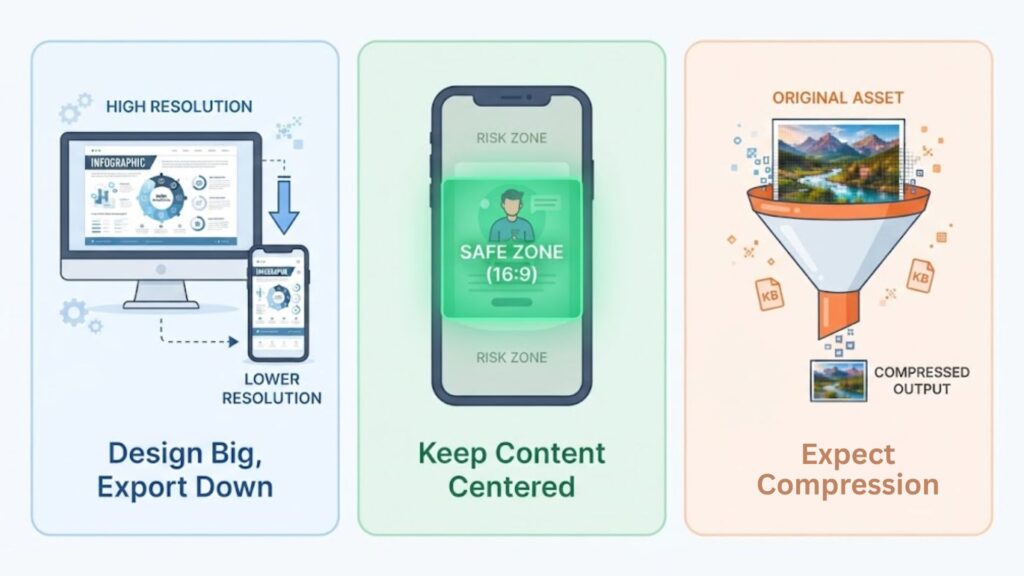
After years of creating social media content, I have boiled everything down to three rules that work across every platform.
Rule 1: Design at the largest size, export downward
Start at 1080 x 1350 or 1920 x 1080 and scale down. Scaling down preserves quality. Scaling up invents pixels and looks soft. This one habit has saved me countless hours of rework.
Rule 2: Keep everything critical in the center 80%
Every platform crops something. Text, faces, and logos in the middle survive all of it. When in doubt, pull your important elements toward the center.
Rule 3: Assume it will be re-compressed
Platforms re-encode every upload. What looks crisp on your computer may look slightly softer after posting. Use bold shapes and text at least 40px tall in a 1080px wide design to maintain readability.
Frequently Asked Questions
What is the best image size for Instagram posts in 2026?
For Instagram feed posts, use 1080 x 1350 pixels (4:5 portrait) for maximum feed visibility. Square posts are 1080 x 1080 pixels. Stories and Reels use 1080 x 1920 pixels.
What is the difference between resizing and cropping?
Resizing changes the total pixel count of the entire image. Everything stays, just at a different scale. Cropping removes outer edges to change composition or aspect ratio. For social media, you often need to do both.
What image format should I use for social media?
Use JPG for photographs and PNG for graphics with text or flat colors. WebP offers 25 to 34 percent smaller file sizes but is not universally supported across all platforms yet.
Why do my images look blurry after uploading?
Platforms re-compress every upload to save storage and bandwidth. Upload the highest quality file you can because Instagram accepts up to 30MB. Use bold shapes and large text to maintain clarity after compression.
What is the safe zone for Instagram Stories?
Keep critical content in the center of a 1080 x 1920 canvas. Leave roughly 250 pixels clear at the top and bottom for interface elements like your profile name, captions, and navigation buttons.
Do I need different images for Facebook and Instagram?
Not necessarily. Both platforms use the same 4:5 portrait format for feed posts and 9:16 for Stories. Create once at 1080 x 1350 and post to both. You will save significant time by designing for both platforms together.
Final Thoughts
Here is the thing about social media image sizes. They look like a small detail until they mess up your post. Then they become the only thing you can think about.
The good news is you do not need to memorize every number in this guide. You just need to remember a few key ideas that carry across every platform.
Start with the four core shapes. Square for feeds, portrait for maximum visibility, vertical for stories and reels, and landscape for video and link previews. That alone covers almost everything you will ever post.
Then follow the three rules. Design big and scale down. Keep the important stuff in the center. Assume the platform will compress your file and plan for it.
Do those things and your social media image sizes will stop being a headache. You will spend less time fixing cropped images and more time creating content that actually connects with people.
And when you need a fast resize, you already know where to find the free tool.
Now go make something worth posting.
